n8n automation, built by engineers and handed over working
Foundreco designs and builds n8n workflows with AI steps, code nodes, error branches and a written handover, in your own n8n Cloud or self-hosted instance. A sample of the n8n systems delivered is below, from a self-running radio station to shipping labels.
Last updated:
What does an n8n automation agency actually do?
An n8n automation agency designs, builds and hands over workflows in n8n, the workflow automation platform that can run in the cloud or on your own server. The five n8n systems described on this page were priced from $600 to $2,500 and built in one to four weeks, each combining AI steps, custom code and error handling in the client's own n8n instance.
Dragging nodes onto a canvas is the easy part. The work is deciding what happens when an API times out, an order arrives twice, a model returns malformed JSON or a customer replies halfway through a sequence. A workflow that only handles the happy path works in the demo and fails on a Tuesday afternoon with nobody watching.
Why build on n8n rather than Zapier?
Three things decide it, and each is checkable in n8n's own documentation:
| What matters | n8n | Why it matters |
|---|---|---|
| Pricing | Billed per workflow execution on n8n Cloud, however many steps run | A twenty-step workflow costs the same per run as a two-step one |
| Hosting | A free, self-hosted Community Edition, or n8n Cloud | Your data can stay on your own server, and volume stops being a cost question |
| Code | The Code node runs JavaScript or Python as a step | When no node does exactly what you need, a few lines of code do |
Zapier is still the faster choice for a simple, low-volume flow between two popular apps, and if that is all you need, you will be told so. The full comparison, with Make and GoHighLevel, is on the AI automation page.
Which tools does Foundreco connect to n8n?
Five n8n systems Foundreco has built, as a sample
Each shows the price range, duration and industry as recorded at delivery, and the node chain as it runs. Client names are withheld.
1. An AI music radio that produces its own shows
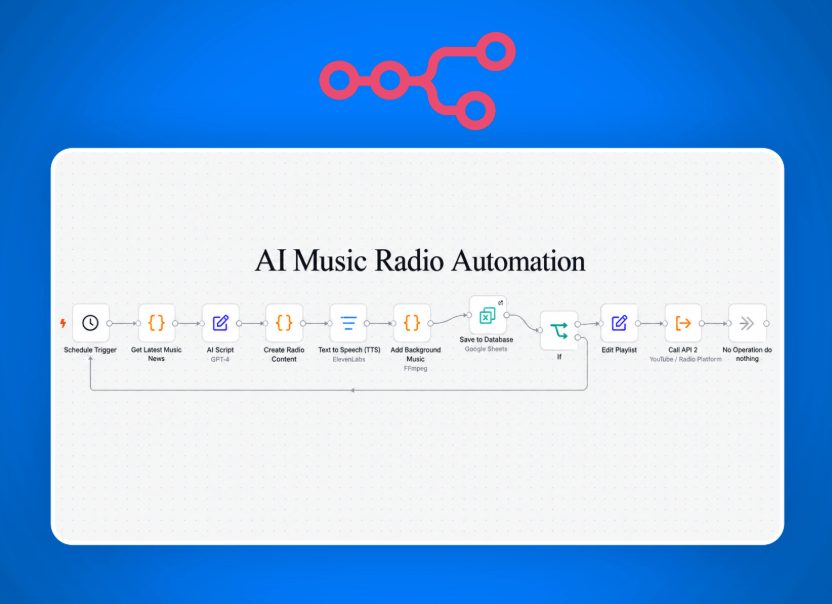
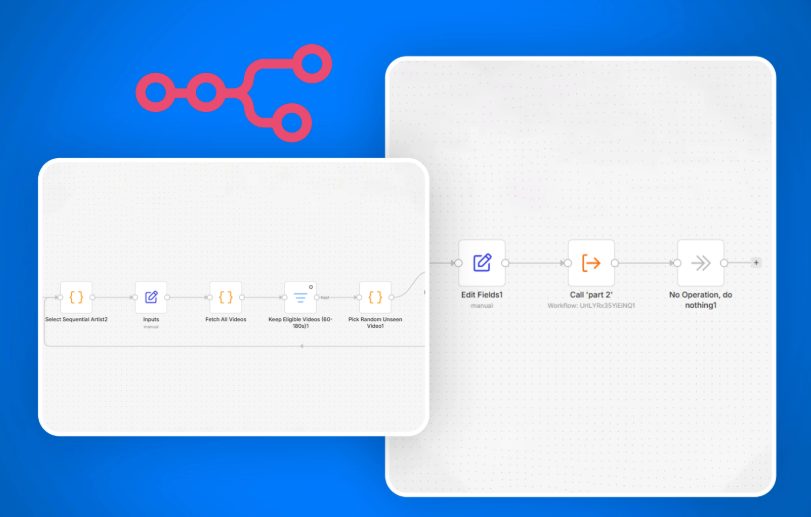
Two workflows. The first runs on a schedule: it gathers the latest music news, has GPT-4 write a script, renders the voice with ElevenLabs, mixes background music under it with FFmpeg, saves the record to Google Sheets and sends the segment to the radio platform through its API. The second manages the video library: it walks artists in sequence, fetches their videos, keeps only those in a set length window, picks one that has not played yet, updates the playlist and calls the next part of the workflow.
- Schedule trigger
- Latest music news
- AI scriptGPT-4
- Create radio content
- Text to speechElevenLabs
- Background musicFFmpeg
- SaveGoogle Sheets
- If
- Edit playlist
- Call platform API
- Select next artist
- Fetch all videos
- Keep eligible lengths
- Pick an unseen video
- Edit fields
- Call part 2
The detail that makes it work unattended is the "unseen" filter: without it, a random pick can play the same video again.
2. Browser order automation for WooCommerce
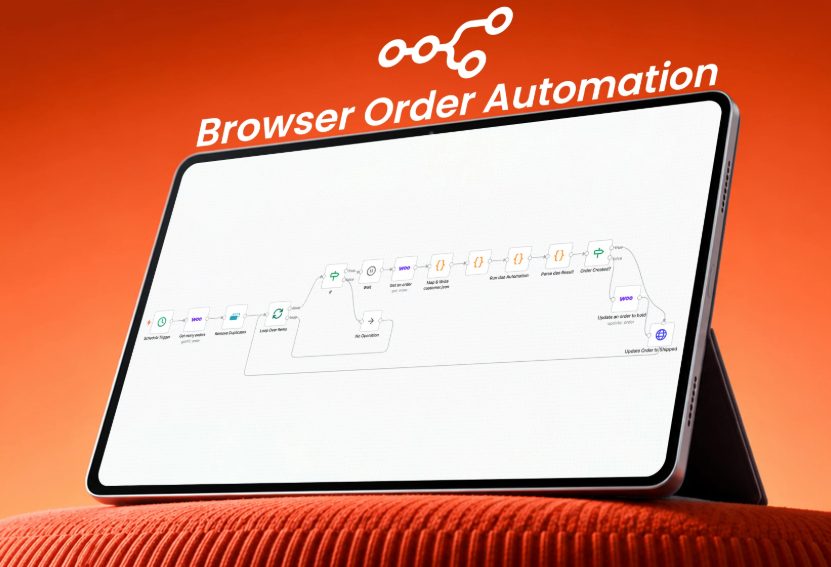
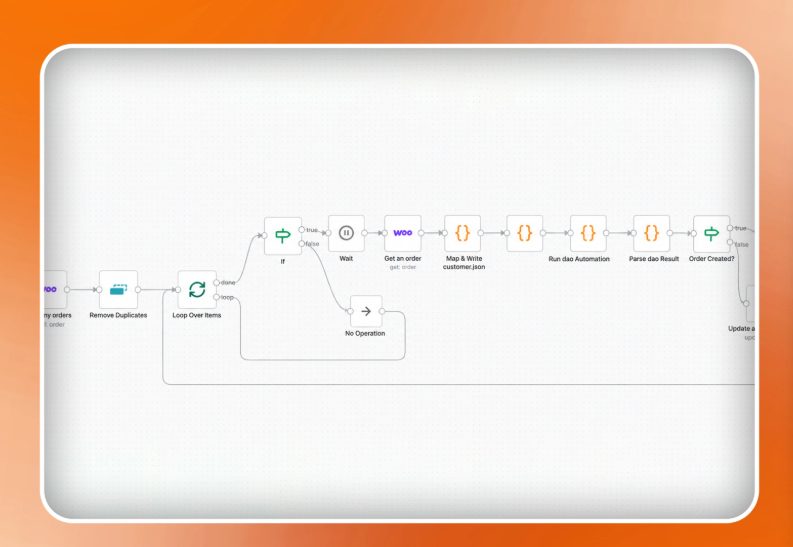
The main order process runs through browser automation rather than by hand. The workflow pulls new WooCommerce orders on a schedule, removes duplicates, then loops through them one at a time with a wait between each, writes the customer details to a file the browser automation reads, runs it, parses the result and marks the order in WooCommerce only if it was really created.
- Schedule trigger
- Get ordersWooCommerce
- Remove duplicates
- Loop over items
- If
- Wait
- Map and write customer file
- Run browser automation
- Parse result
- Order created?
- Update statusWooCommerce
Removing duplicates before the loop, not after, is what stops one order being placed twice.
3. A whole property launch campaign from one form
A developer enters a project once: name, location, price, target buyer, incentives, brand book, masterplan and renders. The system builds a Google Drive folder tree and a tracker row with a project ID and slug, then makes one Gemini call that returns the entire bilingual content library as structured JSON. That payload is parsed, saved to Drive and fanned out to separate workflows for the HubSpot landing page, posters, video reels through JSON2Video, and a Meta ads campaign, which was deactivated in the build shown. Apollo supplies a targeted outreach list.
- Called by intake workflow
- Build prompt
- Generate contentGemini
- Parse response
- Emit content files
- UploadGoogle Drive
- Update statusGoogle Sheets
- Repackage payload
- Call landing page, poster, reels workflows
One structured call rather than twenty separate prompts is deliberate: every piece of copy comes from the same brief, so the landing page and the ads never contradict each other.
4. AI email support that knows when not to answer
Each incoming Gmail message is classified by intent, then searched against a knowledge base using embeddings. The matching passages become context for the response model, which returns a structured answer with a confidence score. Above the threshold the reply is sent and logged as resolved; below it the email goes to a review queue and the support team is alerted in Slack. A second, weekly workflow summarises the logs and posts the digest to email and Slack.
- New emailGmail
- Extract content
- Classify intent
- Search knowledge baseembeddings
- Build context
- Generate response
- Confidence check
- Auto-send and log
- Or: review queue, Slack alert
The confidence check is the whole point. An AI that answers everything is a liability; one that escalates what it is unsure of is a colleague.
5. Shipping labels the moment an order is paid
A paid WooCommerce order triggers it. The workflow extracts the order, validates the address through the Shippo API, calculates weight and dimensions, fetches rates, selects the carrier and generates the label. It then updates the order in the store, downloads the label PDF, saves it to Google Drive and emails the team and the customer. A bad address or a failed label each raise their own alert.
- Order paidWooCommerce
- Extract order data
- Validate addressShippo
- Address valid?
- Weight and dimensions
- Get rates
- Select carrier
- Generate label
- Label created?
- Update order, save PDFGoogle Drive
- Notify team and customerGmail
n8n Cloud or self-hosted?
| n8n Cloud | Self-hosted Community Edition | |
|---|---|---|
| Cost | A monthly plan, billed per execution | Free software, plus a server you pay for |
| Who keeps it running | n8n | You, or whoever you pay to |
| Where the data lives | n8n's infrastructure | Your own server |
| Best for | Getting started, moderate volume, no ops team | High volume, data that must stay in-house |
Most first projects start on Cloud and move only if volume or data rules make it worth it. The move is straightforward because the workflows export as files.
What you get at handover
Questions about n8n automation
How much does an n8n automation cost?
How long does an n8n workflow take to build?
Is self-hosted n8n really free?
Can n8n use AI models like GPT, Claude and Gemini?
Can you take over an n8n setup someone else built?
Describe the workflow. Get a node plan
Tell me what should happen, and in which tools. You get back the node plan, the edge cases worth handling and a fixed price before anything is built.